Toll Calculator GPS Navigation
- 4.0
- Rating
- 100.00K
- Installs
- Free
- Price
 Analysis by App-foxy
I approached Toll Calculator GPS Navigation as a practical Maps & Navigation tool rather than as a full replacement for a dedicated navigation platform. Its purpose is narrower and, in the right situation, more useful: helping drivers think about toll costs before or during a trip. That makes it especially relevant to people who regularly move through toll roads, compare routes, or need to estimate travel expenses for a car, RV, or commercial vehicle.
My first impression was that this is the kind of app you open with a specific question in mind. You may be planning a long drive, checking whether a supposedly faster route is worth the extra charge, or trying to avoid an unpleasant surprise when a trip crosses several toll systems. It is free to download, aimed at everyone, and developed by InfoTalk LLC. The current version is 5.5, and it runs on devices using Android 8.0 or later.
The app has built a modest but meaningful user base, with over 100 thousand installs and a 4.0 average from around 790 ratings. Those figures suggest a useful niche rather than a universally essential travel app. I agree with that position. I would recommend trying it if toll planning affects your regular driving, but I would not install it expecting the same complete experience as a major turn-by-turn navigation service.
You May Also Like

 Blood Strike: 2.5 Anniversary
Blood Strike’s Loadouts Turn Every Drop Into a Tactical Gamble
A close look at Blood Strike’s custom loadouts: how fast access to signature weapons reshapes its battle royale rhythm, rewards preparation, and narrows the gap between fights.

 Pandora - Music & Podcasts
Pandora’s Music Is Easy to Start, but Harder to Recover
Pandora’s strength is its low-effort path from a seed to a station. Its weak spot is how much confidence it asks you to place in connection, setup, and quiet recovery.

 8 Ball Pool
 Is Built on Rivalries, Rematches, and Routine
A close look at the rivalries, rematches, shared routines, and unanswered safety questions that turn a quick pool match into a persistent mobile community.

 Samsung Music
’s Quiet Strength Is Playing What You Already Own
Its reach comes less from spectacle than from dependable access to a personal library. That simplicity is both the app’s strongest retention engine and its ceiling.

 AccuWeather: Weather Radar
AccuWeather Review: A Quick, Clear Forecast for Everyday Decisions
For everyday plans, the best forecast is the one you can understand quickly. AccuWeather makes rain timing, radar, and local conditions easy to act on, with a few trade-offs.

 Hill Climb Racing
Why Hill Climb Racing Still Turns Crashes Into One More Run
A tiny car, a bumpy hill and one more upgrade: Hill Climb Racing keeps resurfacing because its simple chaos makes every near-miss feel personal.
More From Our News Desk



What the app is really useful for before a journey
The strongest way to use this app is as a planning checkpoint. Instead of beginning with the question “Which route is fastest?”, I found it more helpful to ask, “What will this route cost me, and is the time saved worth it?” That change in perspective is important for commuters, families on road trips, and anyone whose travel budget matters.
A realistic example would be a weekend drive in an RV. A toll road might look attractive on a normal map because it cuts distance or avoids congested streets. With a larger vehicle, however, the financial calculation can be less obvious. A toll estimate gives you another factor to compare alongside fuel, driving time, and convenience. I would use the app before leaving, then make the route decision in my usual navigation app.
It can also fit a commercial driving routine. Someone moving goods between cities may need to compare several possible paths, especially when a trip crosses toll programs with different names or payment arrangements. The store summary references systems and terms such as E-ZPass, SunPass, FasTrak, TxTag, and other toll-related services. That makes the app feel aimed at the messy reality of toll travel, where the name of the road is not always enough to understand the charge.
One useful habit is to calculate more than one route rather than accepting the first result. A toll estimate is only valuable when it changes a decision. I would compare a direct toll route with a slower alternative, then consider whether the extra time, fuel, and stress of avoiding tolls actually saves money. For a single driver, the answer may be different from the answer for a family or a business vehicle.
The app is also better suited to deliberate checking than constant background use. I would not keep opening it while driving. The safer workflow is to prepare the route while parked, note the likely toll expense, and then use a navigation service for the actual journey. That division of labor keeps the calculator focused on costs instead of forcing it to compete with tools designed around live driving guidance.
Why connectivity changes the planning experience
Connectivity matters most at the moment you are trying to obtain or verify route information. If your phone has a weak signal in a parking area, at a fuel stop, or near a rural road, the app may be less convenient to use than it would be with a stable connection. I would therefore plan important toll-heavy trips before departure, while I have time to check the result instead of waiting until the last minute.
This is not just a technical annoyance. A connected toll calculator is part of a chain: the phone needs access to the relevant route information, the user needs to enter the trip correctly, and the result needs to be interpreted alongside the actual road conditions. If one part of that chain becomes unreliable, the calculation may no longer be enough to support a confident decision.
I also prefer to treat any estimate as a planning aid rather than an absolute promise. Toll charges can depend on the road, vehicle details, payment method, and the particular toll network involved. A careful user should still check signs and official road information when the cost is important. The app can make the comparison easier, but it should not encourage anyone to ignore roadside instructions.
For that reason, I would avoid making a route decision while moving. Pull over, check the app, and then return to the road with the decision already made. This sounds obvious, but toll exits and lane choices often arrive quickly. A calculator is most helpful when it reduces last-second choices, not when it creates another reason to handle the phone in traffic.
Another practical point is that a connection can be available without being dependable. Underground parking, crowded event areas, mountain roads, and border regions can all make mobile access inconsistent. I would take a screenshot or write down the important cost comparison after planning, not because I assume the app works without a network, but because a simple record can save time if the phone later struggles to refresh information.
Using it in different mobile situations
The app makes the most sense on a phone because toll decisions often happen away from a desk. A driver may be comparing routes at home, checking a trip during a rest stop, or helping a passenger understand why a particular road costs more. The mobile format suits those moments, provided the person using it is not distracted behind the wheel.
For a daily commuter, the best use may be occasional rather than constant. If the same route is repeated every day, one careful comparison can be more valuable than checking every morning. I would use the app when changing jobs, moving house, switching parking locations, or testing whether a new route is worth adopting. The result can then inform a broader commuting decision instead of becoming a repetitive ritual.
For an RV owner, the context is different. Long-distance travel often involves more planning, and a toll charge can become one part of a larger trip budget. I would enter the journey early, compare toll and non-toll options, and then consider whether the route is comfortable for the vehicle. The cheapest road is not automatically the best road if it creates a difficult drive or adds a large amount of time.
Families can use it in a similar way. Parents planning a holiday may want to know whether a toll road buys enough time to justify the cost, especially when fuel and accommodation already stretch the budget. I like the idea of using the app as a conversation tool: one person checks the likely toll expense, another checks the driving time, and the group makes a clear choice before leaving.
Commercial drivers may benefit from a more disciplined routine. I would record the estimated toll amount with the route plan and compare it against the vehicle’s operating costs. That does not turn the app into a complete fleet-management system, but it can add a useful cost check to trip preparation. The important trade-off is that a toll estimate alone does not account for every business expense, so it should support a log or spreadsheet rather than replace one.
People who only need ordinary turn-by-turn directions may find the app unnecessary. If toll costs never affect your route choices, a standard navigation app will probably be simpler. The same is true for someone who expects live traffic, detailed lane guidance, or a single app that handles every aspect of a journey. This tool is more focused, and that focus is both its appeal and its limitation.
What to do when the result is unclear or the connection fails
When a result does not match what I expected, I would first check the inputs rather than immediately blaming the app. Toll calculations are sensitive to the route and vehicle context. A small difference in the chosen starting point, destination, or road preference can change which toll facilities are considered. Repeating the search with carefully chosen locations is a simple but often overlooked recovery step.
I would also check whether I am comparing equivalent routes. One route may pass through a toll facility while another avoids it but takes longer. If the map view or route description is not clear enough for a confident decision, I would verify the road using a second navigation source. That is not a criticism unique to this app; it is a sensible safeguard whenever money and road choices are involved.
If the connection becomes unreliable, I would stop trying to refresh the calculation repeatedly while standing in a poor-signal area. Instead, I would move to a place with better reception, use a previously recorded comparison, or postpone the decision until the phone can load the route properly. Repeatedly tapping a stalled screen rarely improves the answer and can make a simple trip feel more complicated.
A second navigation app remains important in my workflow. I would use Toll Calculator GPS Navigation to investigate toll costs, then switch to the navigation app I already trust for live directions. This approach also gives me a fallback if one service has trouble. The calculator does not need to be the only tool on the phone to be valuable.
There is another recovery technique that helps with trip planning: calculate the major alternatives before leaving. If I know the toll route, the toll-free route, and the approximate difference in time, I am less dependent on a perfect connection at the exact moment I reach a decision point. The app becomes part of preparation rather than an emergency instrument.
Users should also be cautious about treating a displayed amount as permission to use a particular lane or payment method. Toll roads can have separate lanes and payment rules. I would follow road signs and the instructions associated with the vehicle’s toll arrangement. The app can help estimate the expense, but it does not remove the driver’s responsibility to use the correct road and lane.
Keeping mobile use focused and cost-conscious
Because the app is free, it is easy to try without committing money at the start. There are in-app purchases ranging from $9.99 to $34.99 per item, so I would review any purchase screen carefully before confirming anything. My advice is to begin with the free experience and decide whether the app genuinely improves your travel planning before considering an optional payment.
I would also avoid using mobile data casually when a trip does not require repeated checks. Plan the route once, compare the alternatives, and save the key conclusion in a note. This reduces unnecessary refreshing and makes the process easier to repeat. It is especially sensible for travelers whose mobile plan is limited or who are driving through areas where coverage changes frequently.
A good data-conscious workflow is to separate research from navigation. At home or during a proper stop, check the toll options and write down the route choice. During the drive, let the navigation app do its job and avoid reopening the calculator unless the route changes substantially. This approach is safer, uses fewer network requests, and prevents the phone from becoming a source of distraction.
I would be particularly careful before international travel or a journey through unfamiliar toll regions. The names of toll systems can be confusing, and a familiar payment assumption may not apply everywhere. The references to E-ZPass, SunPass, FasTrak, TxTag, and similar services make the app relevant to a range of toll contexts, but I would still confirm the local rules for the exact road and vehicle.
Another small but useful tip is to compare costs per trip rather than judging a toll in isolation. A charge that seems high may still be reasonable if it saves substantial time on a rare journey. Conversely, a modest toll can become expensive when paid every workday. Looking at the pattern of use gives the calculation more meaning than simply asking whether the displayed amount feels acceptable.
For shared vehicles, I would communicate the decision clearly. If several people may drive the car, leave a note with the chosen route and the reason for it. This is especially helpful when one driver prefers avoiding tolls and another values a shorter journey. The app provides a concrete starting point for that conversation, while the final choice remains personal and practical.
Where it fits beside ordinary navigation apps
The comparison with standard navigation apps is straightforward. Mainstream navigation tools are usually better for live guidance, traffic awareness, route following, and the moment-to-moment demands of driving. Toll Calculator GPS Navigation is more useful when the question is financial: how much might this road cost, and should that cost influence the route?
I would not replace my normal navigation app with it. Instead, I would place it earlier in the workflow. First, I would use the calculator to compare toll exposure. Next, I would choose the route that fits my budget and schedule. Finally, I would use a navigation service to follow that route safely. This combination is more practical than expecting one specialized tool to handle every task.
The advantage of a focused calculator is that it encourages a decision many navigation apps treat as a secondary setting. Drivers often choose “avoid tolls” or accept toll roads without understanding the trade-off. A dedicated cost check makes the expense visible before the trip. That can be valuable for people who travel frequently, manage fuel budgets, or drive larger vehicles.
The disadvantage is the extra step. You need to move between apps, interpret the result, and remember that a cost estimate is not the same as a complete route recommendation. Someone who values simplicity above all else may prefer a single navigation app with toll preferences built in. Someone who wants a more deliberate travel budget may appreciate the additional control.
The app’s Everyone content rating also makes it approachable for general household use. I can imagine a parent, commuter, RV owner, or driver planning an occasional long-distance trip using it without needing a specialized professional background. Still, accessibility does not mean every result will be self-explanatory. Users should be prepared to check route details and local toll instructions when the journey matters.
InfoTalk LLC has positioned the product in a practical niche, and the 4.0 average reflects a generally positive but not flawless impression among its users. I see it similarly: useful when its specific purpose matches your needs, less convincing when you want an all-in-one travel assistant. The app earns its place by answering a question that ordinary route planning can leave vague.
My final recommendation is conditional but positive. If you drive through toll regions, plan RV journeys, compare commuting routes, or need a quick way to think about travel costs, I would give Toll Calculator GPS Navigation a try. Use it while parked, plan while your connection is reliable, compare more than one route, and keep a conventional navigation app for the actual drive.
If tolls rarely affect your decisions, or if you expect live traffic guidance and seamless route management from one application, I would skip it and stay with a broader navigation service. The app is not trying to solve every driving problem, and that is worth understanding before installing it.
For me, the main value is not simply displaying a toll amount. It is encouraging a better travel question: is the time saved worth the money spent? Used that way, this free Maps & Navigation app becomes a sensible planning companion, particularly when connectivity is available and the driver takes a few minutes to prepare before setting off.
With its free entry point, Everyone rating, support for devices from Android 8.0 onward, and focused approach to toll planning, Toll Calculator GPS Navigation is worth considering for the right driver. I would treat it as a specialized calculator in a larger travel toolkit, not as a substitute for the navigation app that guides the journey.
FAQs for Toll Calculator GPS Navigation
01What is Toll Calculator GPS Navigation and what does it do?
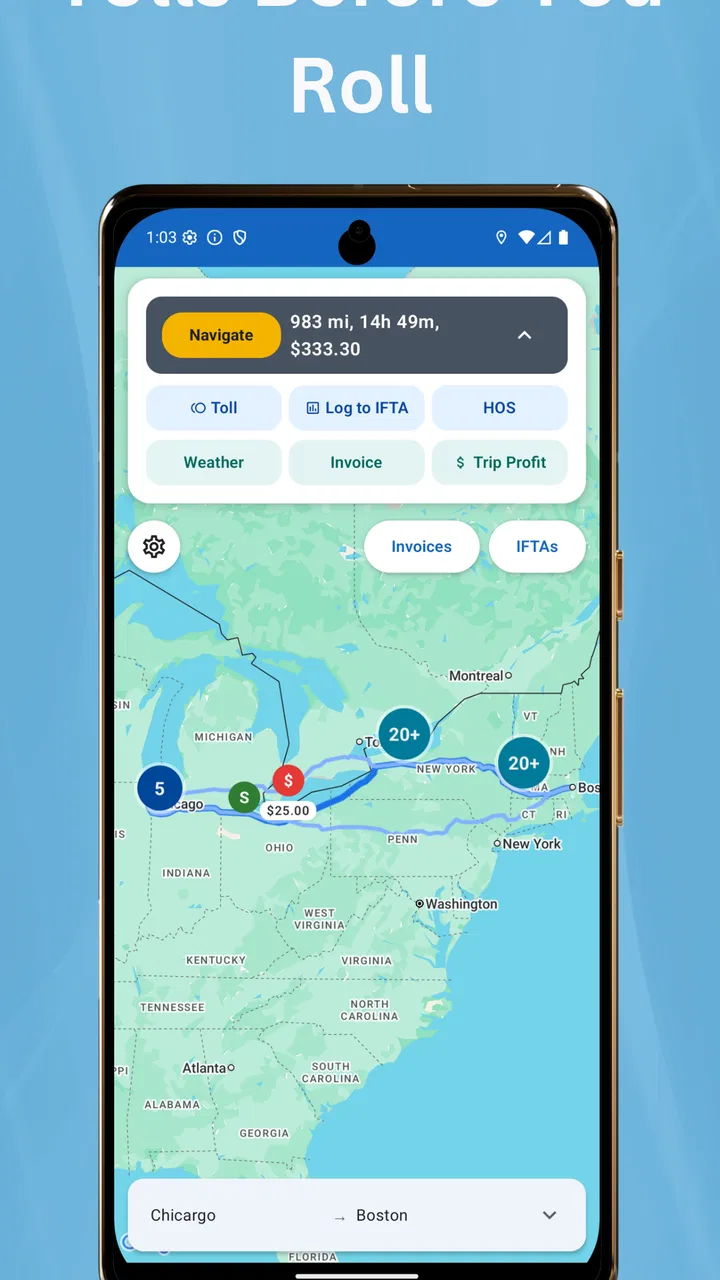
Toll Calculator GPS Navigation is a route-planning app designed to help drivers estimate toll expenses while navigating to a destination. It can compare available routes, display toll roads along the journey, and provide turn-by-turn guidance. This is especially useful for road trips, commuting, delivery work, or anyone who wants to understand the likely total cost before starting a drive.
02How accurate are the toll prices shown by the app?
Toll estimates can be helpful for planning, but they should not be treated as guaranteed final prices. Charges may vary according to the vehicle type, axle count, payment method, time of travel, local discounts, electronic-transponder rates, and recently changed toll policies. Before relying on the estimate for a long trip, check important toll roads through the relevant official transportation authority.
03Does Toll Calculator GPS Navigation work without an internet connection?
The app may require an internet connection for live traffic information, map updates, route changes, and current toll data. Some navigation features could remain available if maps or routes have been downloaded in advance, but offline support depends on the app version and region. Users should test the required route before traveling, particularly in areas with weak mobile coverage.
04Can I customize the route for my vehicle and avoid toll roads?
Many drivers use the app to select route preferences, such as avoiding toll roads, ferries, or certain road types. Depending on the available settings, you may also be able to provide vehicle details that influence toll estimates, including vehicle category or size. Always review the proposed route carefully, because avoiding tolls can increase travel time, distance, fuel consumption, or traffic exposure.
05Is Toll Calculator GPS Navigation suitable for professional drivers and international trips?
The app can be useful for taxi drivers, couriers, truck operators, commuters, and travelers who need to budget road charges in advance. However, coverage and feature quality may differ between countries, states, and toll systems. Professional drivers should confirm that their vehicle class, commercial restrictions, payment method, and local regulations are supported before depending on the app for business-critical navigation.
Pros
- Calculates toll costs before departure for easier trip budgeting.
- GPS navigation helps compare routes with different toll expenses.
- Useful for drivers planning long-distance journeys across multiple regions.
- Can highlight potential toll roads during route preparation.
- Simple interface makes trip cost estimates quick to check.
Cons
- Toll prices may change and differ from the latest displayed estimates.
- Coverage can vary between countries
- regions
- and smaller toll roads.
- Requires location access for accurate route and toll calculations.
- Traffic conditions may alter the final route and total travel cost.
- Some navigation or advanced features may require an internet connection.

Toll Calculator GPS Navigation
Gallery